Status logic
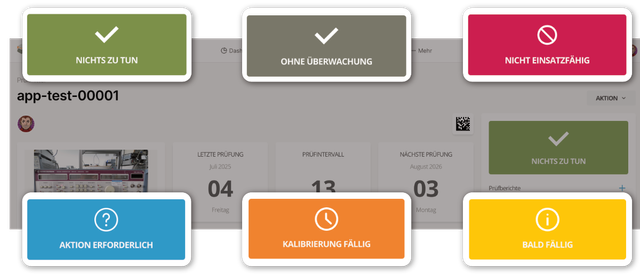
Fig. 1: Inspection equipment status
The status appears in the right column. Memida updates it automatically based on events and, in some cases, user input.
Status is shown via color, icon, and text. Possible values:
| Status | Icon | Color |
|---|---|---|
| Ready for use | Checkmark | green |
| Due soon | (i) | yellow |
| Calibration due | Clock | orange |
| Expired | Struck-through circle | red |
| Calibration requirement removed | Struck-through circle | red |
| Not ready for use | Struck-through circle | red |
| Action required | Question mark | light blue |
| Not monitored | Checkmark | gray |
Table 1: Inspection equipment status values